
TorchLight is tracking an active phishing campaign targeting Microsoft 365 users with fake payment remittance and bank transfer emails. These messages are designed to steal Microsoft 365 usernames and passwords, leading to account takeover and potential payment fraud.
Attackers are using polished, professional-looking messages, making these phishing attempts difficult to spot at a glance. Treat unexpected payment or remittance emails with extreme caution.
What These Emails Look Like
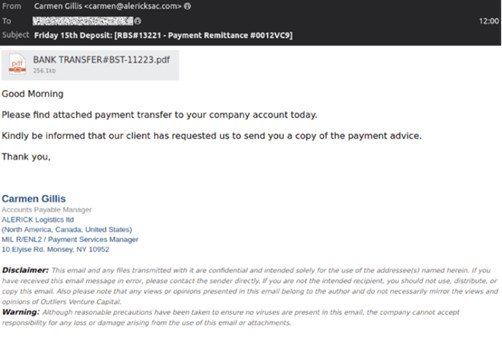
Subject lines often reference deposits or transfers, such as:
- “Deposit Notification”
- “Payment Remittance”
- “Bank Transfer Confirmation”
The sender may appear to be Accounts Payable or a familiar vendor, and the message often claims a client has sent payment. These emails usually contain a link to view a “BANK TRANSFER” document.
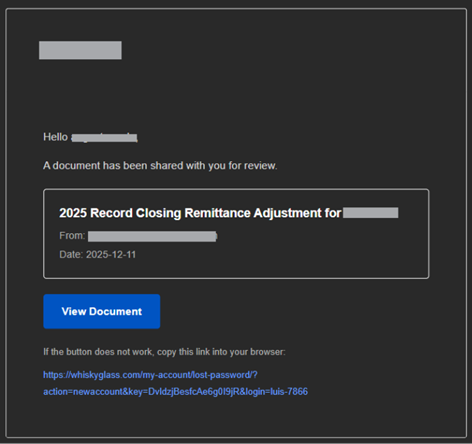
Clicking the link takes you to what looks like a normal Microsoft 365 sign-in page, but it is a fake credential-harvesting website.
Why This Is Dangerous
If you enter your email and password on the fake page, attackers gain immediate access to your Microsoft 365 account.
With that access they may:
- Send emails as you or your organization
- Change payment instructions or vendor account details
- View or exfiltrate sensitive data
- Monitor your mailbox for future financial activity
After capturing your credentials, the fake login page may redirect you to a legitimate Microsoft site to make the attack feel normal and prevent suspicion
How to Protect Yourself
Do not click links in unexpected payment or remittance emails.
Always check the website address before signing in. Genuine Microsoft sign-in pages will be on microsoft.com or office.com.
Treat any financial-related message with urgency or pressure as suspicious.
If a payment notification seems odd, verify it using a known phone number or a separate, trusted communication channel.
What To Do If You Clicked or Entered Your Details
If you interacted with one of these emails or entered your credentials on a suspicious page:
- Do not wait or assume nothing happened.
- Contact TorchLight immediately.
Our team will investigate, secure your account, reset access where needed, and check for any misuse. Speed matters in preventing further compromise.
TorchLight is here to help contain and remediate any potential impact. If you believe you may have interacted with one of these emails, reach out to TorchLight support right away.
Augusto Melo – Manager, Managed Security Services