
The TorchLight Security Operations Center (SOC) has seen a massive increase in fake DocuSign phishing emails since Monday of this week. This threat vector has been in use since early 2024, but this week’s spike is real. At this point, consider all DocuSign emails hostile until you have carefully confirmed they are legitimate.
Published Oct 16, 2025 by Augusto Melo in Awareness and Vulnerability Alert. Reviewed by the TorchLight SOC.
Fast checks before you click
- Sent from docusign.com or docusign.net only
- Reply-to matches those exact domains
- No attachments and no QR codes
- Every link leads back to docusign.com or docusign.net
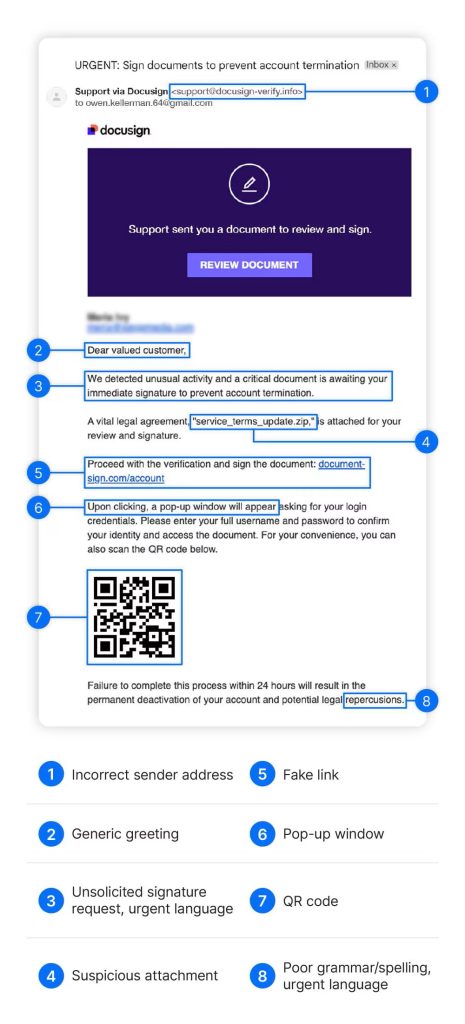
Signs your DocuSign email is fake
There are telltale signs that a contract platform email is not legitimate. If you spot any of these, stop and verify through a separate channel before clicking anything or entering credentials.
The document is unexpected
You were not expecting a contract or signature request. Unprompted documents deserve a call or a separate email to the sender to confirm.
Look-alike reply-to domains
Misspellings such as docu-sign.net or docsign.com. The correct domains for DocuSign are docusign.com and docusign.net, nothing else.
Generic greetings
Legitimate DocuSign documents typically open with your first name or business name. “Dear customer” is a red flag.
A high sense of urgency
“Your account will be terminated if you don’t act by…” Pressure to act fast is a classic phishing tactic.
Bad grammar and spelling
Grammar mistakes, odd punctuation, and misspellings rarely appear in real DocuSign notifications.
Attachments or QR codes
A legitimate DocuSign email contains neither. Threat actors use QR codes hoping you will switch to mobile, where security is generally looser than on a laptop or desktop.
What a legitimate DocuSign email looks like
A real DocuSign email comes from docusign.com or docusign.net, and every link inside it leads back to those same domains. These attacks work because they look authentic at first glance. A deeper look at the full URL and a healthy dose of skepticism will keep your digital life safe and secure.
- Sender and reply-to use ONLY docusign.com or docusign.net
- No attachments and no QR codes, ever
- If a link lands on a login page, exercise an extremely high amount of caution and inspect the full URL before entering credentials
Why these emails keep landing in your inbox
DocuSign’s API (application programming interface) is being used extensively by threat actors because registration is easy and there is little enforcement around what gets sent, especially sender addresses built to closely resemble the DocuSign domain. Because DocuSign is a trusted, industry-leading contracting provider and these emails originate from a trusted source, they will continue to land in your inbox.
- Threat actors register on the platform and send at scale
- Sender addresses are crafted to closely resemble the real domain
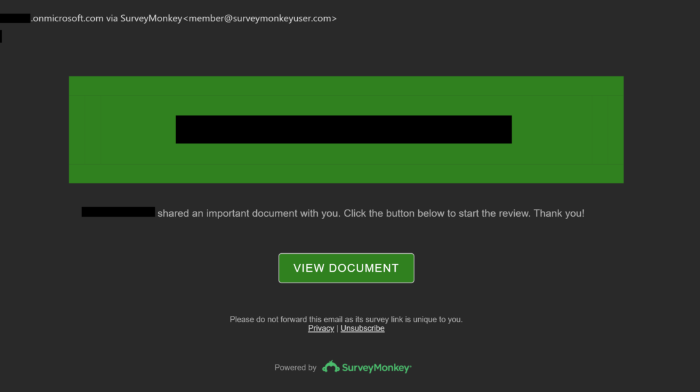
- The same method is hitting survey and opinion tools. The example shown here arrived Wednesday from one of our customers; the reply-to address is close, but not the legitimate surveymonkey.com domain
Watched around the clock, so you never face this alone
“TorchLight has been more than a vendor to our multi-branch credit union, they are more like our partner … delivered for almost 20 years.”
— Annettee Babb, CEO, PrimeSource Credit Union- 24/7 proactive threat monitoring and response
- Nearly two decades serving regulated and high-trust industries
- Tools that can quickly confirm and remediate account compromise
- We speak examiner, and we speak boardroom
Frequently asked questions
How can I tell if a DocuSign email is real?
A legitimate DocuSign email comes from docusign.com or docusign.net, has a reply-to on only those domains, and contains links that lead only to docusign.com or docusign.net. It will not contain attachments or QR codes, and it typically greets you by first name or business name rather than a generic greeting.
What are the correct DocuSign domains?
The correct domains for DocuSign are docusign.com and docusign.net. Look-alike domains such as docu-sign.net or docsign.com are fraudulent.
I clicked a link and entered my credentials. What should I do?
Change that password immediately, enable multi-factor authentication, and alert your IT or security team. TorchLight has tools that can quickly confirm whether an account is compromised and remediate it. Call 833-761-0695 or use the form on this page.
Why do these phishing emails get past spam filters?
Threat actors send them through DocuSign’s own API (application programming interface), so the emails originate from a trusted source. Registration is easy and enforcement around look-alike sender addresses is loose, so the emails keep landing in inboxes. The same method is being used with survey and opinion tools such as SurveyMonkey.
Worried You May Already Be Compromised?
We have tools that can quickly confirm and remediate. Prefer to talk now? Call 833-761-0695.